
- Joomla 4.4
- Joomla 5
- Joomla 6
- SP Page Builder
- Helix Ultimate
- YOOtheme Pro
- Any template
Joomla!® EasySpeedThe Joomla speed plugin for Core Web Vitals
JoomlaMax EasySpeed is a Joomla system plugin that makes any Joomla 4.4, 5 or 6 site load faster and improves its Core Web Vitals, without changing how the site looks. On your own server it removes unused CSS, defers render-blocking scripts safely, serves images in WebP or AVIF at the size each screen needs, keeps text still while web fonts load, and answers guests from a built-in page cache before Joomla starts building. It is pure PHP and works on ordinary shared hosting, with no external service, no API key and no Node.js.
- Starts in measure-only mode
- Every feature has its own switch
- Built-in page cache
- Runs on shared hosting
- Uninstalls cleanly
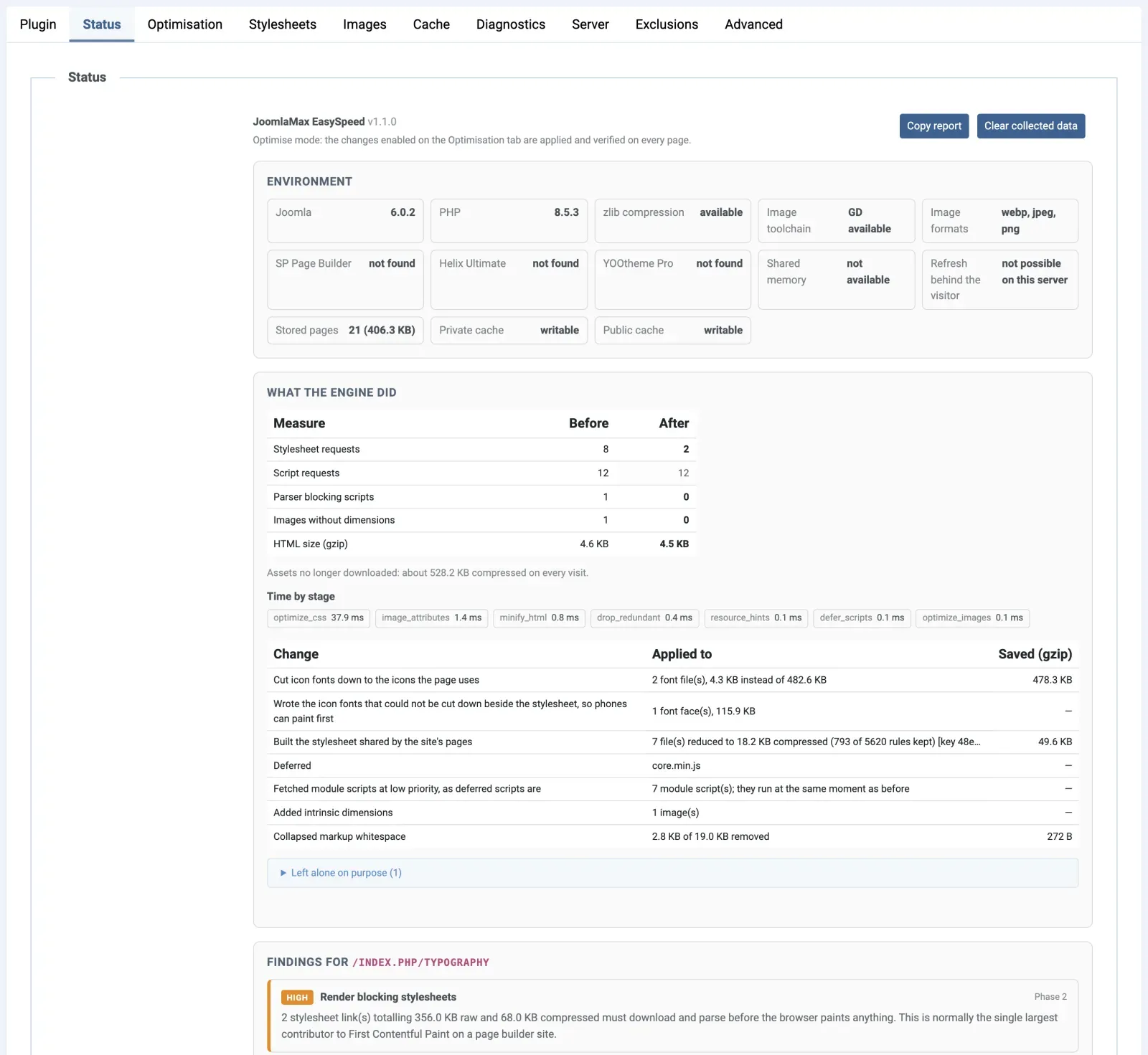
Measured, not promised
PageSpeed results measured on two live Joomla sites: mobile score from 63 to 99 and from 59 to 98
With EasySpeed on, the mobile Lighthouse score of joomlamax.com rose from 63 to 99, and a magazine home page went from 59 to 98. Both are the median of three Lighthouse 12 mobile runs on 13 Oct 2026; “without” is the same live page with ?easyspeed=off.
Check it yourself: joomlamax.com in Google PageSpeed Insights (mobile) (opens in a new tab)
joomlamax.com: score 63 → 99
SP Page Builder + Helix Ultimate, product pages and a blog
| Mobile, lab | Without | With |
|---|---|---|
| Largest Contentful Paint (LCP) | 7.1 s | 1.9 s |
| First Contentful Paint (FCP) | 5.4 s | 1.3 s |
| Render-blocking files | 7 | 0 |
| Page weight | 1,116 KiB | 641 KiB |
| Images | 218 KiB | 51 KiB |
Scores of the three runs: 63, 89, 62 without · 99, 99, 99 with.
A magazine home page: score 59 → 98
SP Page Builder + Helix Ultimate, with ads, analytics and 40+ images
| Mobile, lab | Without | With |
|---|---|---|
| Largest Contentful Paint (LCP) | 8.4 s | 1.9 s |
| Cumulative Layout Shift (CLS) | 0.136 | 0.001 |
| Render-blocking files | 7 | 0 |
| Page weight | 4,321 KiB | 1,239 KiB |
| Images | 3,393 KiB | 458 KiB |
Scores of the three runs: 59, 55, 59 without · 72, 98, 98 with.
What no plugin can remove for you
Ads, analytics and chat cost points of their own. EasySpeed lists and weighs them but never removes them; the magazine page kept its ads when measured.
Measure your own site
Test your front page three times on PageSpeed Insights’ Mobile tab and note the middle result, then again with ?easyspeed=off added.
The problem
Why Joomla sites are slow, and what EasySpeed does about each cause
Joomla sites are usually slow for the same few reasons: templates, page builders and extensions load code for everything they could show, images and fonts arrive in the wrong size or order, and Joomla rebuilds every page for every visitor.
Unused CSS loaded on every page
One SP Page Builder and Helix Ultimate page we measured loaded about 787 KB of CSS. EasySpeed: one stylesheet with only the rules your pages can use.
Render-blocking scripts that stop the page
EasySpeed: scripts deferred safely, in their original order, and reCAPTCHA loaded when a visitor reaches its form.
Images too big, and the main one loaded last
Many templates lazy-load even the main (LCP) image. EasySpeed: WebP or AVIF copies at several widths, the main image first, missing dimensions added.
Fonts that make text jump
Google counts that jump as layout shift (CLS). EasySpeed: stand-in fonts sized to match yours, and icon fonts cut to the icons used.
Background videos without a poster
One home page’s LCP was 13 to 15 seconds. EasySpeed: a poster, made in your browser, that paints before the video: LCP fell to 6 seconds.
Joomla builds every page, for every visitor
One magazine site took 2.85 to 3.50 seconds a page. EasySpeed: a built-in page cache that sends guests the finished page before Joomla starts: 0.26 to 0.34 seconds.
First visits pay most, and PageSpeed Insights measures them
A new visitor waits for every stylesheet and head script. EasySpeed: on a first visit they are written into the page itself; with a very large stylesheet, first-screen rules come first. New in 1.1
Features
Everything EasySpeed does to speed up your Joomla site
EasySpeed works on every part of a Joomla page that costs time: stylesheets, scripts, images, background videos and fonts, plus the time Joomla spends building each page, which its built-in page cache saves for guests. Every feature has its own switch.
Only the CSS each page uses
One stylesheet with only the rules your pages use, in their original order, including classes your scripts add later, with no list to maintain.
Stylesheets and first visitsJavaScript deferred safely
Blocking scripts run later, in their original order; scripts the page needs at once stay put. reCAPTCHA waits for its form; AdSense can wait for its ads.
ScriptsSmaller images in WebP and AVIF, and video posters
WebP copies at several widths, AVIF when switched on, the main image first. Make posters gives background videos a still that paints first.
Images and videoFonts that keep text still while they load
Fallback fonts are scaled to your web fonts, so nothing jumps and CLS stays low. Icon fonts such as Font Awesome shrink to the icons used.
FontsA built-in page cache that keeps itself current
Guests get the finished page before Joomla starts. The store fills itself from your sitemap, and saving an article refreshes just the pages it touches.
Page cacheBuilt-in adaptations for SP Page Builder, Helix Ultimate and YOOtheme Pro
EasySpeed reads the finished page, so any Joomla template works. These three also get automatic adaptations.
Every Joomla siteSafe to switch on, easy to switch off
A new install only measures; every optimised page is checked before sending. Add ?easyspeed=off to any address to see it without EasySpeed.
Real speed, not score tricks
Your page's own scripts never wait for the visitor to move the mouse. Ads, analytics and chat stay: EasySpeed shows what each costs, and you decide.
Honest speedNew in 1.1 marks what arrived in version 1.1.0, New in 1.1.1 what arrived in 1.1.1. Opt-in marks a feature that is off by default. Every setting explained in the documentation.
How it works
How EasySpeed makes a Joomla page faster, step by step
EasySpeed lets Joomla build each page as usual, then measures it, rebuilds it for speed, checks the result and stores it, so the next guest gets the finished page before Joomla starts. It all runs in PHP on your own server.
Measure what the page uses
After your template and extensions finish, EasySpeed reads which elements, classes, images and fonts the page uses.
Rebuild it for speed
It trims the CSS, defers blocking scripts, offers lighter WebP images and matches fallback fonts.
Check every change
If a structural check fails, the original page goes out and the Status tab says why.
Store the finished page
With Cache pages on, it is kept for the next guest; an edited article clears only the pages that showed it.
Serve it before Joomla starts
Guests get it at once, with their own form token put back in.
It starts by measuring, not changing
A new installation starts in Diagnostics mode, only reporting on the Status tab. When the report looks right, switch Mode to Optimise.
Heavy work happens behind the visitor
Filling the store, rebuilding edited pages and making image copies run after the page is sent, on PHP-FPM or LiteSpeed servers.
Stylesheets and first visits
Remove unused CSS from every Joomla page, with nothing for you to maintain
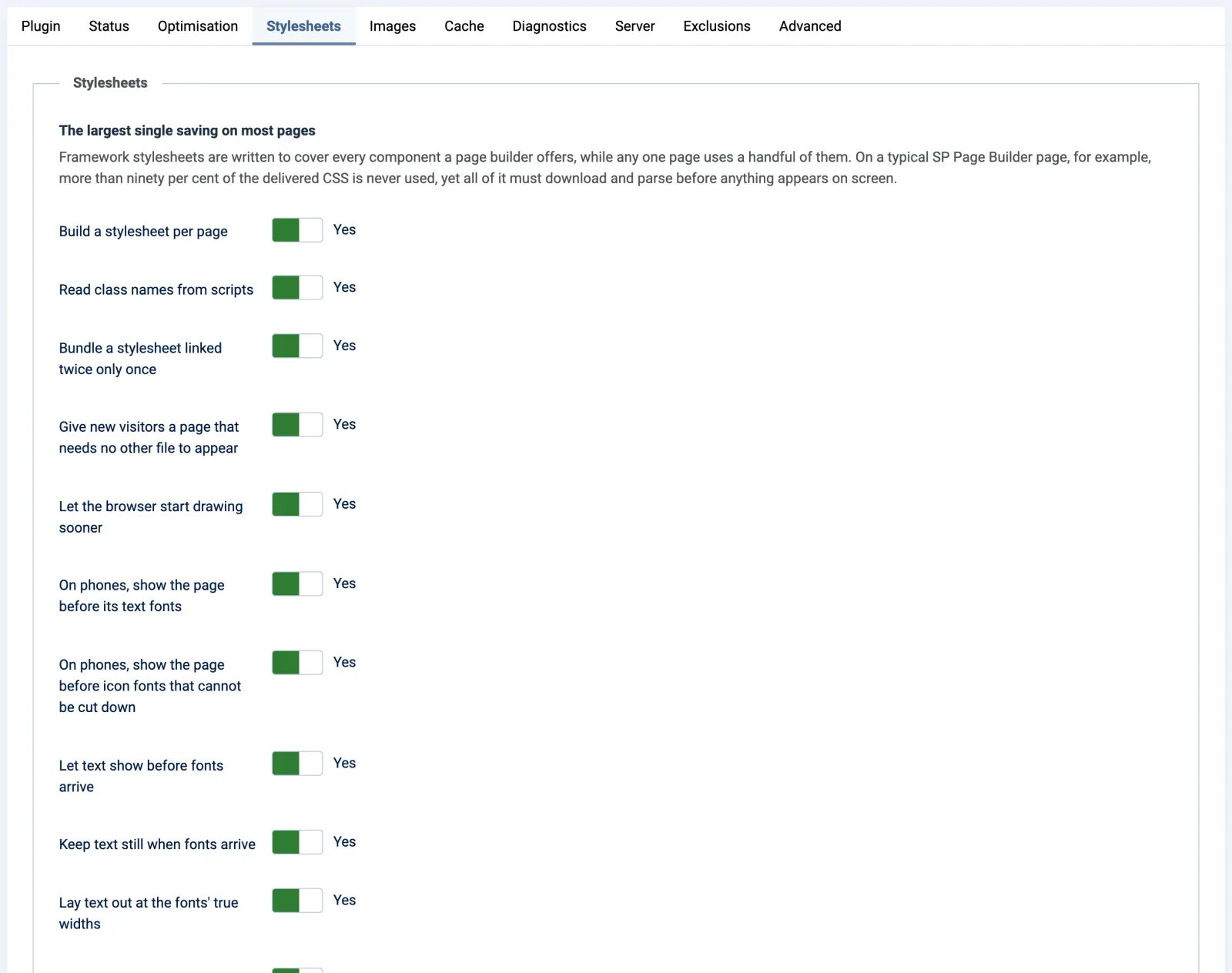
EasySpeed replaces the stylesheets a Joomla page loads with one file that holds only the rules your pages can use, in their original order, so the page looks exactly as before.
One stylesheet, cut to the rules your pages use
- Classes your scripts add later, found for you. Read from your scripts, so there is no list of dynamic selectors to keep up.
- Animations and fonts kept. Animations in use, including those only a script names, and every font declaration stay.
- Shared by pages of the same kind. Your articles or product pages share one smaller file the browser keeps from click to click. New in 1.1
- Rebuilt by itself. Edit a template stylesheet and there is nothing to clear.
Before: a page we measured, about 787 KB of CSS
- bootstrap.min.css 190 KB
- sppagebuilder.css 202 KB
- font-awesome (Helix Ultimate) 121 KB
- font-awesome (SP Page Builder) 121 KB
- template, presets, custom.css +
- animations, add-on styles +
After: one file, only the rules in use
- One stylesheet for pages like this rules they use
- Font Awesome, one copy icons it shows
- On a first visit inside the page
First visits need no other file to appear
A visitor arriving from Google or a PageSpeed Insights test gets the stylesheet and blocking head scripts inside the page. Later clicks use cached files.
Critical CSS for first visits when a stylesheet is over 400 KB
A first visit gets only the rules its first screen draws with; the rest comes at the end of the page and, since 1.1.1, is fetched once the first picture has been drawn. With only those rules, tested pages looked the same to the pixel at four widths on six sites.
Transitions held while the rest of the stylesheet arrives
Otherwise every element with a transition animates at once as it lands: over a hundred on one directory listing. Blocking time on a throttled phone fell from 454 to 276 ms.
- A stylesheet linked twice is bundled once. New in 1.1 One directory front page went from 761 KB to 637 KB.
- Repeated style blocks and a second Font Awesome removed. Listed on the Status tab.
- Stylesheets from other domains folded in. Opt-in A copy on your own server is bundled with the rest, so that request disappears.
- Two short lists for the rare exception: Never remove these classes and Never touch these stylesheets.
Scripts
Defer JavaScript safely: the page appears first, and every script still runs
EasySpeed defers the render-blocking JavaScript that stops a browser drawing your Joomla page. Every script still runs by itself, in its original order, and the page's own scripts never wait for the visitor to move the mouse.
Safe defer that reads every script file first
- Files that code needs at once stay in place. A library the page uses straight away, such as jQuery or React as a UMD file, keeps its place, and so do the files it needs. New in 1.1
- Ads that write into the page keep working. A
document.writetag on your own site or from a known ad server is never deferred. New in 1.1 - First visits wait for nothing. Scripts the head still needs come inside the page; see stylesheets and first visits.
- Your exceptions. List them under Never defer these scripts; the Status tab shows every script kept, and why.
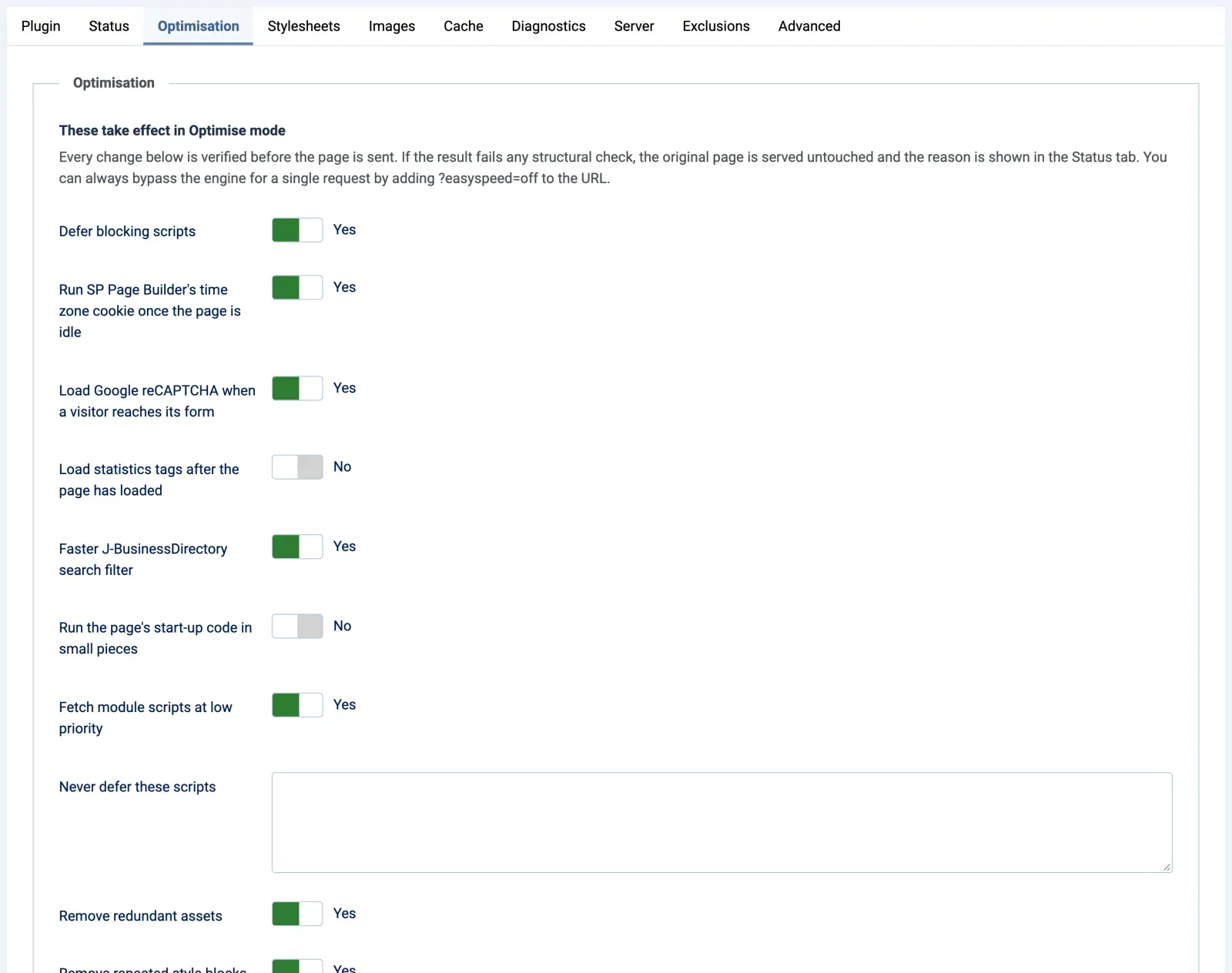
Google reCAPTCHA loads when a visitor reaches the form
Its script, about a megabyte, took 2.2 seconds of a test phone's processor on one front page. Now it starts when the captcha nears the screen or its form is used.
Joomla's module scripts are fetched at low priority
Bootstrap, the files it imports, the menu and the keep-alive stop competing with your stylesheet and main image, and still run at the same moment. One front page painted half a second sooner.
Statistics tags can start after the page has loaded
Google Tag Manager, its own snippet included, the Meta pixel, Hotjar and others start on the first scroll, tap, key or mouse movement, or about three seconds after load; a very short visit may go uncounted.
Start-up code in small pieces, so a phone answers taps sooner
On a directory listing, blocking time on a throttled phone fell from 276 to 173 ms. It stays off because PageSpeed Insights scored that page one point lower.
SP Page Builder's time-zone script waits until the page is idle
Its cookie is for the next page, so it now runs once the browser is idle, or within about three seconds.
A faster J-BusinessDirectory search filter
Plain city, region and category names skip the browser's HTML reader, which made a single 600 ms task on one directory site. The filter works as before.
Statistics tags and Google AdSense can wait for the visitor
- Load Google AdSense when an ad comes near the screen. Only for Google AdSense Its script waits until an ad slot is within two screens of the view, or the first scroll, tap or key. AdSense's automatic ads and its consent message wait with it, so without an ad slot near the screen they too appear only after the first touch. Fewer impressions can mean less income.
- Start the statistics tags: Only on the first touch. Under Load statistics tags after the page has loaded. No timer: the tags wait for the first scroll, tap, key or mouse movement, so a visitor who leaves without touching the page is not counted.
EasySpeed never minifies or combines scripts, never removes tags (why third-party tags stay your call) and never holds the page's own scripts back until a mouse move.
Images and video
WebP and AVIF images at the right size, made on your own server
EasySpeed makes smaller WebP copies of your JPEG, PNG and WebP pictures at several widths, and AVIF copies where your server can, so each browser downloads the size its screen needs. Your original files are never changed.
The right size of picture for every screen
- WebP at several widths. 400, 800, 1200 and 1600 pixels by default, plus the full size.
- Made with PHP's own GD library. No image API, quota or per-image fee.
- Never heavier than the original. A copy is offered only when lighter, with transparency kept.
- Smaller copies for small spaces. A fixed pixel limit in your stylesheet becomes the
sizeshint, so a thumbnail never fetches the banner's copy. - Backgrounds too. JPEG and PNG backgrounds in your stylesheets become WebP; older browsers get the original.
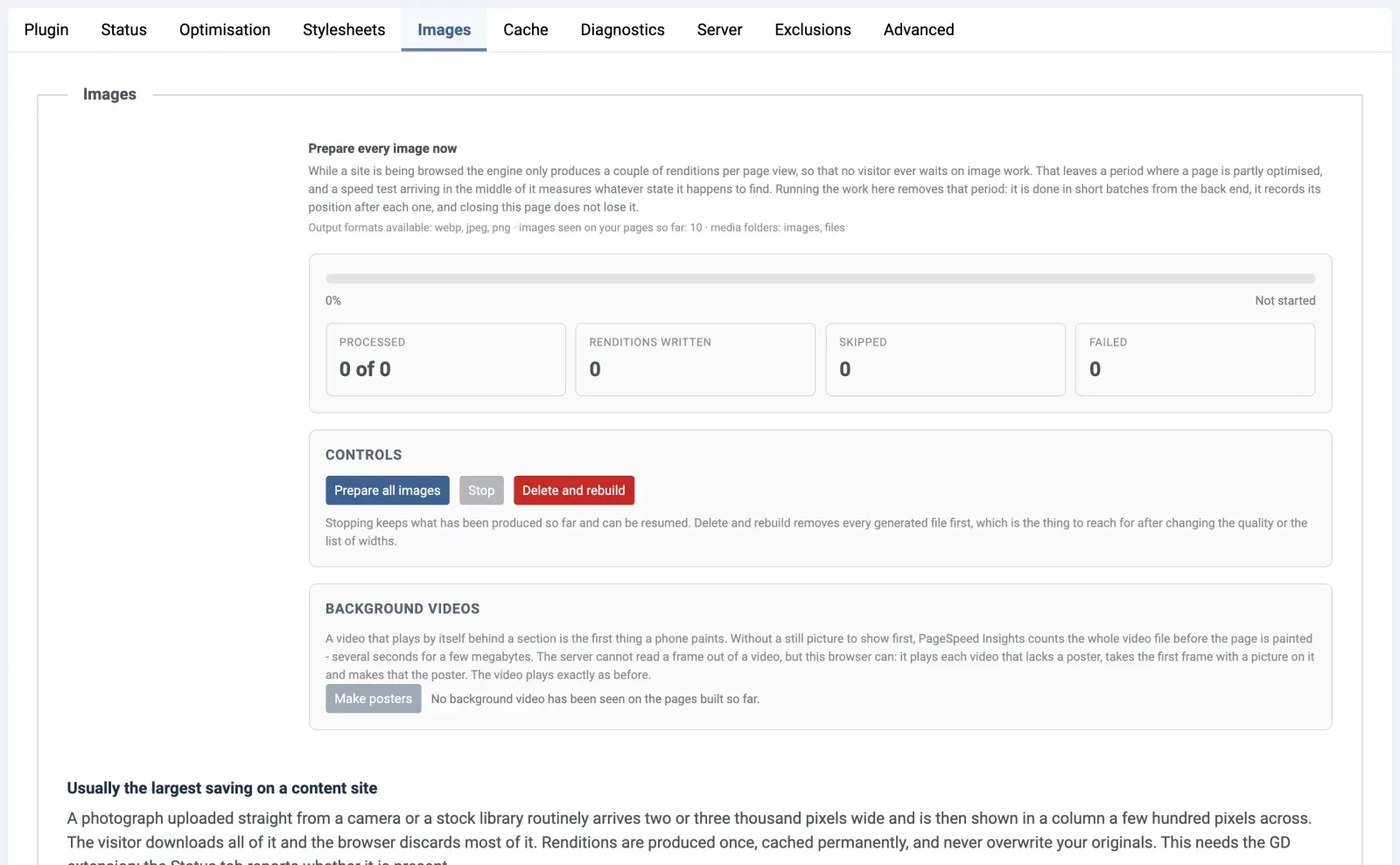
AVIF where it is smaller, and only where your server can write it
At each width, browsers that show AVIF get the smaller file, AVIF or WebP; photographs came out 10 to 25% smaller on three sites. Your server is tested first and the setting says what is missing; transparent pictures stay WebP. Since 1.1.1, a background check pauses AVIF and serves WebP if the web server starts refusing AVIF; AVIF comes back by itself.
Prepare all images: the whole site in one go
One button makes every copy, heaviest first, in batches that resume where they stopped; stored pages then refresh in the background. New in 1.1
Core Web Vitals: the main image first, nothing that jumps
Lazy loading, with the main image (LCP) first
The main image gets high priority and a preload naming the same copies, so only one file downloads. Images further down load lazily.
One main image for phones, another for desktops
A phone never fetches the desktop's picture first; SP Page Builder, Bootstrap and YOOtheme Pro classes such as uk-hidden@m are read.
Missing width and height added, so nothing jumps
Values your template set are never overwritten, and sliders show only their first slide until their script takes over, so Cumulative Layout Shift (CLS) stays low.
Left alone on purpose: images on other domains, SVG and GIF files, files under about 12 KB, and any tag with data-easyspeed-skip.
Background videos: the poster paints first, the film follows
Each self-playing background video gets a still picture to show first, so a hero video no longer decides when your page appears.
Videos with controls or a player, UIkit's uk-video included, and YouTube or Vimeo embeds are left alone.
- Posters made in your browser. Make posters saves the clearest frame of the first three seconds as WebP and JPEG. New in 1.1
- The video starts after its poster, once the page has loaded and it is near the screen. New in 1.1
- Poster only for visitors who ask for less: reduced motion, Data Saver or 2G. New in 1.1
- Poster only on phones, under 768 pixels wide. New in 1.1Opt-in
Every image and video setting explained in the documentation
Fonts
Web fonts without invisible text or layout shift
EasySpeed shows text at once in a stand-in font sized to match your web font, so lines do not re-wrap when the real font arrives and Cumulative Layout Shift (CLS) stays low.
Fallback fonts sized to match, so text stays still
- Text shows before fonts arrive.
font-display: blockbecomesswap; a choice the author made on purpose is kept. - Matched on every system. Windows, Mac, Android and Linux, italics included, with nothing fetched.
- Helix Ultimate and SP Page Builder typography, written in style blocks, gets stand-ins too.
- True widths, so PageSpeed Insights no longer reports a jump your visitors never get; letters may look slightly softer on Windows.
Without EasySpeed
- Fonts set to “block” text hidden
- Stand-in font, other width other line breaks
- Web font arrives page jumps
With EasySpeed
- Text shows at once
- Stand-in scaled to your font same line breaks
- Web font arrives no jump
Font Awesome and other icon fonts cut to the icons the page uses
A small copy on your own server holds just the icons the page's stylesheet draws. The full font stays declared, so an icon a script adds later still appears.
On phones, text first and its font a moment later
On a phone's first visit, Google Fonts and other text fonts apply just after the page appears, or within three seconds.
Font Awesome 7 no longer holds up the first paint on phones
WOFF2-only icon fonts cannot be cut, so on a phone's first visit they apply once the page is drawn. Switch it off if icon-only buttons matter.
Measured on real Joomla sites; gains depend on your template.
Page cache
A built-in Joomla page cache that fills itself and refreshes only what changed
EasySpeed's page cache, called the page store, keeps each finished, optimised page and sends it to the next guest before Joomla starts building, so your server answers in a fraction of the time.
One switch on the Cache tab, then it runs itself
Turn on Cache pages once your pages look right in Optimise mode; the store then fills, refreshes and tidies itself.
- Every stored page in view, with Rebuild and Remove for each one.
- A lifetime you choose, from 12 hours to a year, as a safety net for pages nobody edits.
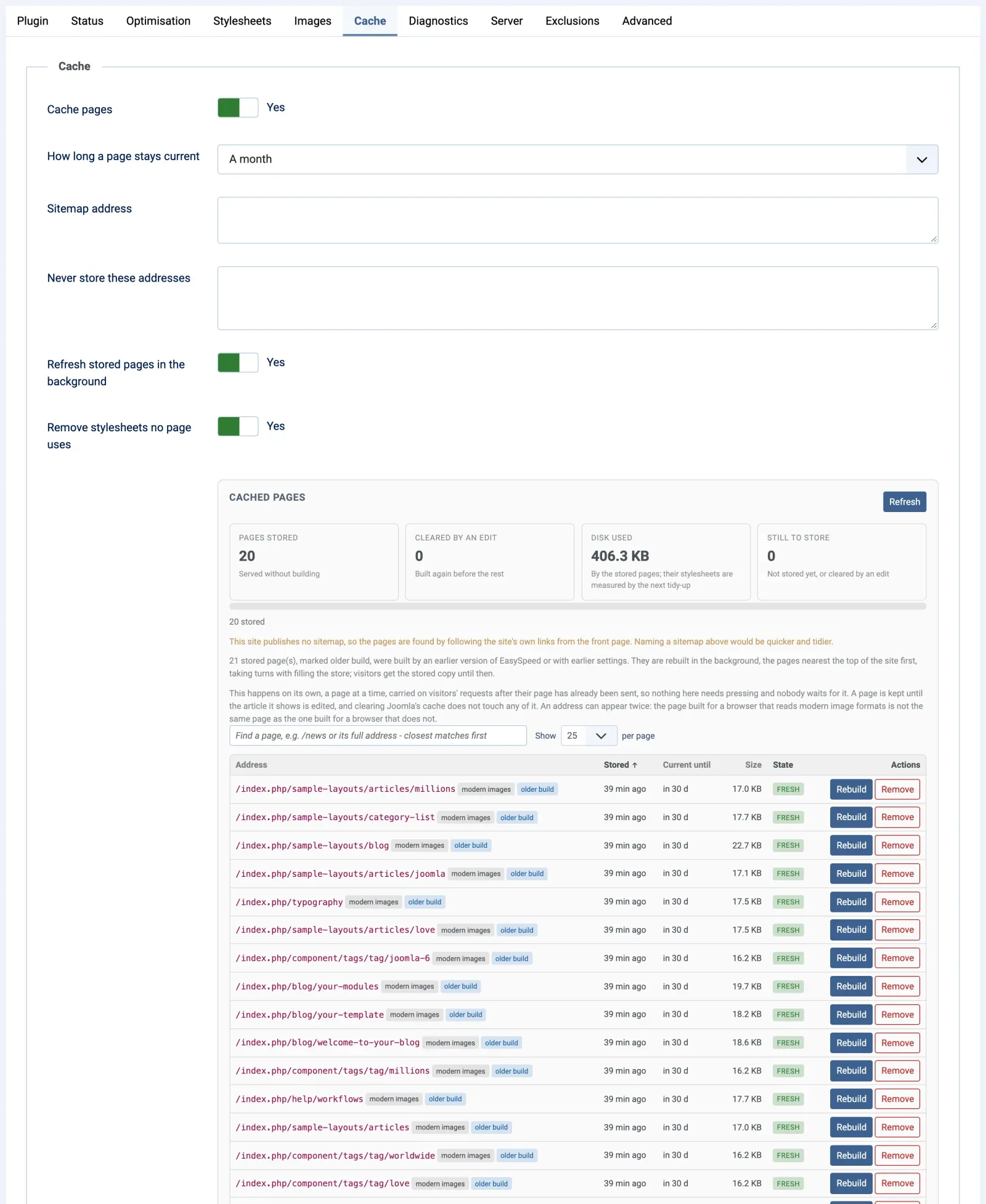
Edit an article, and only the pages that showed it are refreshed
Its own page and every list it appeared in are cleared; the rest stay stored. Since 1.1.1, banner, tag and category changes also refresh the pages that show them, modules included. Module, menu, template or plugin changes clear everything.
Rebuilt within seconds of a save, SP Page Builder included
Saving an article, or a page in SP Page Builder's editor, rebuilds the pages it affects first, on PHP-FPM, FastCGI or LiteSpeed hosting.
Updates and settings changes no longer empty the store
Stored pages are rebuilt in the background, those nearest the top of your site first, and visitors keep getting the stored copy meanwhile. Only settings such as Mode and Apply to empty it at once.
Filled from your sitemap before anyone asks
It reads the sitemap your robots.txt declares, /sitemap.xml or up to five you name; without one, it follows your own links from the front page.
Never store these addresses: optimised, but built fresh every time
Search results, a basket or a checkout listed here stay optimised but are built for every visit, unlike Excluded URLs, which switches EasySpeed off.
Blocked by Cloudflare or a firewall? The Cache tab tells you
A page stopped by a bot check, firewall, 403 or 503 is shown with its reason while visitors keep the earlier copy. The fix: allow your server's own IP address.
- Safe for forms, shops and member areas. Only guests get stored pages, each carrying that visitor's own form security token.
- One stored copy, whatever link a visitor followed. Tracking parameters such as
utm_*,gclidand, since 1.1,gad_sourceland on one page. - Stored outside Joomla's cache folder, and tidy on disk. A Joomla update never empties the store or loses its progress. New in 1.1
- Joomla's Clear Cache empties it too (System > Clear Cache > Delete All), unless you switch off Clear stored pages with Joomla's cache. New in 1.1.1
- Check where a page came from. The response header
X-EasySpeed: hitmeans it came from the store.
Compatibility
Works on every Joomla 4.4, 5 and 6 site, with built-in adaptations for SP Page Builder, Helix Ultimate and YOOtheme Pro
EasySpeed works on the finished page Joomla sends, after every other extension has had its turn, so it suits any template, page builder and extension. Where SP Page Builder, Helix Ultimate or YOOtheme Pro are in use, extra adaptations apply by themselves.
Faster SP Page Builder pages: built-in adaptations
- Main image first, even when the builder marks it lazy, and only the one each screen shows.
- One Font Awesome, not two, and its animations keep their rules.
- Time zone cookie script run once the browser is idle. Only for SP Page Builder
- Background video posters in
data-posterpaint first. New in 1.1 - Saves in its editor rebuild the stored page at once. New in 1.1
- Empty picture fields (
url("/")) no longer make browsers fetch your front page. New in 1.1
Faster Helix Ultimate sites: built-in adaptations
- Unused Chosen widget dropped on Joomla 6 pages that have nothing for it. Only for Helix Ultimate
- No second Font Awesome, and icons cut to those in use.
- Typography that does not jump: its typography fonts get size-matched fallback fonts too.
Faster YOOtheme Pro sites: built-in adaptations
- UIkit visibility classes read, such as
uk-hidden@m, so each screen gets the main image it shows. - Menus right on a first visit: dropdowns (
uk-drop) stay closed and the active item (uk-active) is drawn right. New in 1.1 - Videos UIkit plays itself (
uk-video) are left to UIkit. New in 1.1 - Detected on the Status tab. New in 1.1
Options made for one extension or service say “Only for”
Their settings say so. Without it they do nothing, so you can leave them on.
- Load Google reCAPTCHA when a visitor reaches its form Only for Joomla's reCAPTCHA captcha plugin New in 1.1
- Faster J-BusinessDirectory search filter Only for J-BusinessDirectory New in 1.1
- Load Google AdSense when an ad comes near the screen Only for Google AdSense Opt-in New in 1.1.1
Multilingual sites, folders, CDNs and shared hosting
- Multilingual sites: each language is stored separately, so no visitor gets a page in another language.
- A site in a folder, such as example.com/site/, works like any other.
- Cloudflare and other CDNs: no address rewriting needed, and the Server tab tests whether your CDN keeps your files.
- Ordinary shared hosting: PHP 7.4 or newer with GD for WebP. AVIF is optional, and EasySpeed tests your server first.
Control and safety
Safe to try on a live site: measure first, then decide what EasySpeed may change
EasySpeed starts in Diagnostics mode, which only measures and reports, so you see what it would do before any visitor sees a change.
Safeguards that are on from the first minute
- Diagnostics mode first. Pages go out unchanged until you switch Mode to Optimise.
- Every feature has its own switch. The few trade-offs start off, with the honest reason each one starts off.
- Guests only by default. The administrator, edit forms and page builder editors are never touched.
- Every page checked before it is sent. If a check fails, the original goes out and the Status tab says why.
- Steps aside while Joomla's debug mode is on, and on the pages Joomla shows in pop-ups and iframes.
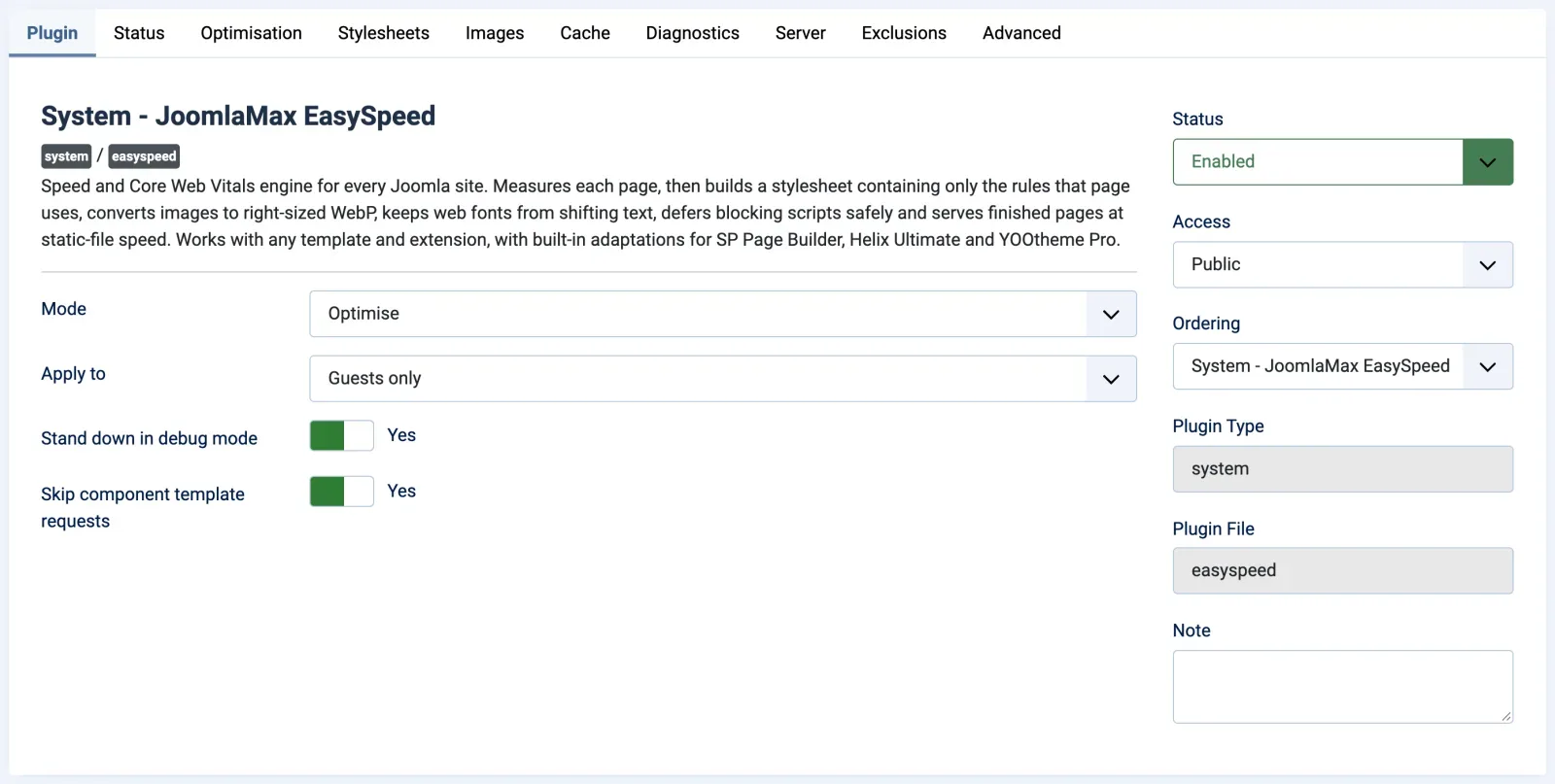
Reports that show what changed and why a page is slow
- Status tab: before-and-after numbers for the latest page, and each change with what it saved.
- Diagnostics tab: where build time goes, which modules are rebuilt on every visit, and each statistics or advertising tag weighed.
- Server tab: compression, browser caching and your CDN checked, with the exact .htaccess or nginx lines for anything missing.
- Your files checked in the background. While AVIF is on, EasySpeed asks your site in the background (PHP-FPM or LiteSpeed hosting), once a day and whenever .htaccess or web.config changes, for its pictures, stylesheets and fonts; the Server tab names any refusal and the fix. New in 1.1.1
- Copy report: everything on the Status tab as plain text, ready for a support ticket.
- Your data stays on your server. EasySpeed contacts another server only when you ask it to.
Your way back, from one page to the whole site
| You want to | Do this |
|---|---|
| See one page without EasySpeed | Add ?easyspeed=off to its address. Only that request is affected. |
| Switch one feature off | Set its switch to No and save. |
| Leave a page or a component alone | Add it to Excluded URLs or Excluded components. |
| Stop EasySpeed on the whole site | Set Mode to Off. Stored pages are removed too. |
| Remove it completely | Uninstall it. Nothing of EasySpeed is left behind; your content, original images and template stay. |
Our principle
Honest speed: real improvements for your visitors, not PageSpeed score tricks
EasySpeed makes the page your visitors get faster, and that same page is the one PageSpeed Insights measures.
No “delay all JavaScript until the visitor moves” trick
Deferred scripts still run by themselves, in order, so the first tap finds a working menu, slider or form. No special version for test robots.
Your ads, analytics and chat are your decision
EasySpeed never removes a third-party tag. List the tags on the Diagnostics tab names each statistics and advertising tag a page loads, heaviest first.
Measured on the same page, on and off
Each result compares one live page with EasySpeed on and with ?easyspeed=off, as the median of three Lighthouse runs. See the measured results
Five switches that start off, and the honest reason why
| Switch | What it gives | Why it starts off |
|---|---|---|
| Load statistics tags after the page has loaded | Analytics and similar tags start on the first scroll, tap, key or mouse movement, or a few seconds after load; you can drop the timer (Only on the first touch). | A visit that ends before the tags start may not be counted. With Only on the first touch, that is any visit without a touch, and PageSpeed Insights no longer runs these tags at all, so its score no longer shows what they cost your visitors. |
| Load Google AdSense when an ad comes near the screen New in 1.1.1 | AdSense starts when an ad slot nears the screen, or on the first scroll, tap or key. | Fewer ad impressions can mean less income. |
| Run the page's start-up code in small pieces | 173 ms of blocking time instead of 276 on a directory listing. | PageSpeed Insights scored that page one point lower. |
| Use AVIF where accepted | Photographs 10 to 25% smaller; the lighter of AVIF and WebP is sent. | It needs PHP 8.1 or newer with AVIF support, and about four times the server work of WebP. |
| Poster only on phones | Phones show the background video's poster and never download the video. | It changes what phone visitors see. |
Comparison
How EasySpeed compares with other Joomla speed plugins
EasySpeed differs from other Joomla speed plugins in how much it does for you: it finds the CSS each page needs without a hand-kept list, keeps text still while fonts load, makes images on your own server and refreshes only the cached pages an edit changed.
| Feature | EasySpeed 1.1 | JCH Optimize Pro | JSpeed |
|---|---|---|---|
| Price | EUR 49 per year, every feature included | USD 55 per year; a free edition is also available | EUR 49.99, one year of updates |
| Joomla versions | 4.4, 5 and 6 | 4, 5 and 6 | 3, 4, 5 and 6 |
| Works with any Joomla template | Yes | Yes | Yes |
| Built-in adaptations for SP Page Builder & Helix Ultimate | Yes, applied automatically where they are used; YOOtheme Pro has its own adaptations too | General-purpose | General-purpose |
| Removing unused CSS | Per page and automatic: class names that scripts add later are read from the scripts themselves, and pages of the same kind share one smaller file | “Reduce Unused CSS”, which requires “Optimize CSS Delivery”; classes added by JavaScript are entered by hand as “CSS Dynamic Selectors” | “Above-the-Fold CSS” and “Assets Removal” |
| CSS for the first paint | First visits get the page's reduced stylesheet inside the page; when it is over 400 KB, the first screen's rules (critical CSS) come at once and the rest once the first picture is drawn | “Optimize CSS Delivery” (critical CSS) | “Above-the-Fold CSS” |
| Page cache | Built in: fills itself from your sitemap; an edit rebuilds only the pages that showed it, SP Page Builder saves included; refreshed in the background after updates and settings changes; every stored page listed with Rebuild and Remove | Page Cache plugin with a recache crawler; Pro can serve cached pages through .htaccess | Asset caching for return visits |
| Web fonts | Text shows before fonts arrive; fallback fonts sized to match, so text does not jump; icon fonts cut to the icons the page uses | display=swap, preload and preconnect for Google Fonts | Not detailed in the feature list |
| Images | WebP made on your own server, plus opt-in AVIF (the smaller file is sent); srcset at several widths; the main image chosen per screen width; posters for background videos | “Optimize Images” with JCH's Image API; next-gen formats; properly sized images | WebP and AVIF converted in real time; srcset generation |
| CDN address rewriting | Not needed with proxy CDNs such as Cloudflare, so no rewriting; the Server tab checks whether your CDN keeps your files | Yes | Yes |
The EasySpeed column describes version 1.1.1 (13 October 2026); the others come from each vendor's own website, documentation and Joomla Extensions Directory listing, checked on 28 September 2026. Products change, so check each vendor for current details. JCH Optimize and JSpeed are trademarks of their respective owners.
Need a free edition, Joomla 3 support or file addresses rewritten to a separate CDN domain? The table shows which plugin offers it. Use one optimisation plugin at a time. Every EasySpeed setting explained in the documentation
At a glance
EasySpeed at a glance: requirements, compatibility and licence
JoomlaMax EasySpeed 1.1.1, updated on 13 October 2026, is a Joomla system plugin for Joomla 4.4, 5 and 6 on PHP 7.4 or newer. It works with any template and extension, runs in plain PHP on ordinary shared hosting, and costs EUR 49 a year with every feature, updates and 12 months of support.
What your site needs
| Joomla | 4.4, 5 and 6 |
|---|---|
| PHP | 7.4 or newer |
| Images | WebP needs PHP's GD extension, which most hosts include. AVIF is optional: PHP 8.1 or newer with GD AVIF support and a server that sends .avif files as image/avif; EasySpeed tests this. |
| Templates | Any Joomla template, from Cassiopeia to commercial frameworks and your own. Built-in adaptations for Helix Ultimate and YOOtheme Pro. |
| Page builders | Any, because EasySpeed works on the finished page. Built-in adaptations for SP Page Builder. |
| Extensions | Any. The options that serve one extension or service say so: Joomla's reCAPTCHA plugin, J-BusinessDirectory and Google AdSense. |
| Hosting | Ordinary shared hosting; pure PHP, no Node.js, no external service, no API key. Background work needs PHP-FPM/FastCGI or LiteSpeed. |
| CDN | Cloudflare and other CDNs; no address rewriting to a separate CDN domain |
| Languages | Multilingual sites and sites installed in a folder; settings screens in English |
Version, licence and support
| Product | JoomlaMax EasySpeed, a Joomla system plugin, listed in Joomla as System - JoomlaMax EasySpeed |
|---|---|
| Version | 1.1.1, updated . First released on (1.0.0). |
| What it does | Unused CSS removed per page, critical CSS for first visits, scripts deferred safely, WebP and AVIF images, fonts that keep text still, and a built-in page cache. Each feature has its own switch. |
| Safe start | Starts in Diagnostics mode, which only measures. Guests only by default; the administrator, edit forms and page builder editors are never touched. |
| Licence | GNU General Public License version 2 or later |
| Price | EUR 49 a year, every feature included, no add-ons |
| Updates | One click in Joomla's own updater, with your Download ID from joomlamax.com |
| Support | 12 months included. Copy report on the Status tab gathers your versions and what EasySpeed did. |
| After the year | The plugin keeps working; a renewal brings new versions and support |
| Documentation | Every setting explained, with a quick start, troubleshooting and the changelog |
| Developer | JoomlaMax |
Documentation
Every EasySpeed setting explained in plain words
The EasySpeed documentation explains every setting, tab by tab: what it does, its default, when you might change it and what to watch out for. It starts with a quick start that takes you from Diagnostics mode to a filled page cache, and it is written for site owners, not only developers.
- Quick start. Twelve steps in order: measure, check your server, switch on Optimise, prepare images and video posters, and turn on the page cache.
- Settings reference. Every option on every tab, with a search box: type fonts, defer or AVIF to find the setting you need.
- Troubleshooting. Common problems and their fixes, from a menu that will not open or an advert that stays empty to a page store that fills slowly.
- FAQ, glossary and changelog. Direct answers, page speed terms such as LCP and CLS in plain words, and what changed in each version.
- What’s new in 1.1.1 (13 October 2026): stylesheets fetched after the first picture, tags and AdSense that can wait, banner and category edits that reach stored pages at once, and AVIF paused if the server refuses it.
FAQ
Frequently asked questions about the EasySpeed Joomla speed plugin
Direct answers to what Joomla site owners ask before they install EasySpeed: compatibility, hosting, the page cache, images, scores and price.
What is JoomlaMax EasySpeed?
EasySpeed is JoomlaMax’s speed plugin for Joomla 4.4, 5 and 6: a system plugin that optimises each page on your own server, so it reaches visitors sooner and does better on Core Web Vitals while looking exactly the same. It trims and merges your CSS, defers blocking JavaScript safely, serves right-sized WebP or AVIF images, keeps text still while web fonts load, and answers guests from its own page cache.
Does EasySpeed work with my template and extensions?
Yes. EasySpeed keeps no list of supported templates or extensions: it works on whatever page Joomla produces, so Cassiopeia, a commercial framework, your own template and any mix of extensions are handled the same way. Options that serve a single extension, such as Joomla’s reCAPTCHA captcha plugin, J-BusinessDirectory or Google AdSense, are labelled “Only for” in the settings and do nothing on a site without it.
Does EasySpeed work with YOOtheme Pro, SP Page Builder and Helix Ultimate?
Yes. All three get built-in adaptations on top of what every site gets, and they apply by themselves wherever the product is in use. SP Page Builder: lazy main images, sections built per device, background video posters, its time-zone script, its animations and saves in its editor. Helix Ultimate: a duplicate Font Awesome, its typography fonts and the Chosen widget on Joomla 6. YOOtheme Pro: UIkit visibility classes, dropdown menus and the active menu item on a first visit, and videos UIkit plays itself. Every adaptation is described in the compatibility section.
Does EasySpeed support Joomla 6?
Yes. EasySpeed 1.1.1 supports Joomla 4.4, Joomla 5 and Joomla 6 on PHP 7.4 or newer, and the screenshots on this page were taken on a Joomla 6 site. If your Joomla or PHP version is too old, the installer stops and tells you which version is needed.
Does EasySpeed run on shared hosting?
Yes, that is what it is built for. All the work happens in PHP inside Joomla, and WebP copies only need PHP’s GD extension, which most hosts include; the Status tab tells you whether yours has it. On PHP-FPM/FastCGI or LiteSpeed hosting, EasySpeed also works in the moments after a visitor has their page, filling the cache from your sitemap and rebuilding edited pages within seconds. Without that, pages are stored as guests first open them.
Does EasySpeed work with Cloudflare or another CDN?
Yes. EasySpeed works behind Cloudflare and other CDNs, and the Server tab checks whether your CDN actually keeps your files. Let the CDN keep stylesheets, scripts, images and fonts, and leave whole pages to EasySpeed's page cache, because its pages differ with the visitor's browser and with whether they have just arrived. Since version 1.1, the Cache tab tells you when a bot check or firewall challenges your own server; allow your server's IP address and /media/plg_system_easyspeed/. EasySpeed does not rewrite file addresses to a separate CDN domain.
Do I still need Joomla's page cache or another optimisation plugin?
No. When you switch on EasySpeed's Cache pages, switch off Joomla's System - Page Cache plugin, because two page caches make it hard to know which copy a visitor got. EasySpeed's store keeps a separate copy for each image format and language, puts each visitor's form security token into the page and clears only the pages an edit changed. Use one optimisation plugin at a time as well. If you keep another one for something else, switch off its overlapping features: combining or minifying CSS and JavaScript, lazy loading by script, image conversion and page caching.
Does EasySpeed convert images to WebP and AVIF?
Yes. EasySpeed makes WebP copies of the large images on your site at several widths (400, 800, 1200 and 1600 pixels by default), on your own server, and each browser picks the size that fits its screen. AVIF is opt-in: switch on Use AVIF where accepted and, if your server passes EasySpeed's test, browsers that show AVIF get whichever file is smaller, with transparency kept. Your original files are never changed, browsers that cannot show WebP get the original, and Prepare all images makes every copy at once.
Does EasySpeed remove unused CSS and generate critical CSS?
Yes, both, without an outside service and without a list of selectors to maintain. Unused rules are dropped from the merged stylesheet, while class names your scripts add later, such as a menu’s open state, survive because EasySpeed reads the scripts. First-time visitors get that stylesheet inside the page. When it is over 400 KB, only the first screen’s rules (the critical CSS) come at once and the rest follows: on a large directory site, about 60 to 150 KB for the first screen instead of about 400 KB.
Will EasySpeed break my site, my forms or my shop?
EasySpeed checks every optimised page before it is sent: if a structural check fails, the visitor gets the page exactly as Joomla built it, and the Status tab gives the reason. It starts in Diagnostics mode, which only measures, works for guests only by default and gives every feature its own switch. Logged-in visitors never get stored pages, each guest's form security token is put back into the page, and login, registration and Smart Search are excluded by default. Add pages that show something personal to a guest, such as a basket, to Never store these addresses, and add ?easyspeed=off to any address to compare it with the original.
Will EasySpeed improve my PageSpeed Insights score?
On both live Joomla sites we publish, yes: the mobile Lighthouse score went from 63 to 99 and from 59 to 98 with EasySpeed switched on. No plugin can honestly promise your number, though. If your score stays lower, the cause is usually something no page optimiser controls, such as a slow server, a CDN that caches nothing or heavy third-party tags, and the Server and Diagnostics tabs point it out. The real-visitor data in PageSpeed Insights covers the last 28 days, so it catches up a few weeks after the lab score.
Does EasySpeed remove ads, Google Analytics or chat?
No. EasySpeed never removes third-party tags, because that decision is yours. List the tags on the Diagnostics tab shows which statistics and advertising tags a page loads, so you can weigh their cost. Ad scripts on your own site that write into the page, and the tags of known ad servers, are never deferred, and any other advert script can be added to Never defer these scripts. If you choose to, Load statistics tags after the page has loaded (off by default) starts Analytics, Tag Manager, the Meta pixel and similar tags on the first interaction or a few seconds after the page has loaded, or only on the first interaction, and Load Google AdSense when an ad comes near the screen (also off) starts AdSense when an ad slot nears the screen.
Does EasySpeed work on multilingual Joomla sites?
Yes. The page cache keeps a separate copy of each page for each language. A Joomla site installed in a folder works the same as one at the top of the domain. EasySpeed's own settings screens are in English.
How much does EasySpeed cost, and what happens when the year ends?
EUR 49 a year buys every feature, with no add-ons, one-click updates in Joomla through your Download ID and 12 months of support. If you do not renew, nothing stops: the installed version goes on working, and you simply stop receiving new versions and support.
What is new in EasySpeed 1.1.1?
Version 1.1.1, released on 13 October 2026, fetches the rest of a large stylesheet after a first visit’s first picture has been drawn, so that picture shows sooner. Statistics tags, Google Tag Manager’s own snippet included, can wait for the visitor’s first touch, and Google AdSense for an ad to come near the screen (both off by default). Banner, tag and category changes reach stored pages at once, Joomla’s Clear Cache can empty the store, and a background check pauses AVIF if the web server refuses it. It also fixes Joomla’s message box, which EasySpeed had stopped from closing. Version 1.1.0 (1 October 2026) brought critical CSS, video posters, YOOtheme Pro adaptations, opt-in AVIF and background refreshes of stored pages. The EasySpeed changelog lists every change.
What happens if I uninstall EasySpeed?
Everything EasySpeed created is removed: stored pages, generated stylesheets, image copies, video posters and its reports. Your content, original images, template and other extensions are untouched, and Joomla builds pages exactly as it did before. Lines you added to .htaccess from the Server tab stay, because they are ordinary server settings.
More answers are in the documentation FAQ, and fixes for common problems in the EasySpeed troubleshooting guide.
Simple Joomla licence
EasySpeed price: EUR 49 a year with every feature
EUR 49 / year
Everything EasySpeed does, with a year of updates and support. Version 1.1.1, updated .
- All features, no add-ons: page cache, unused CSS and critical CSS, safe script defer, WebP and AVIF images, font fixes
- Joomla 4.4, 5 & 6, any template, with built-in adaptations for SP Page Builder, Helix Ultimate and YOOtheme Pro
- One-click updates in Joomla with your Download ID
- 12 months of support
- Runs on your own server: pure PHP, ordinary shared hosting, no external service or API key
EasySpeed keeps working after the year ends. Renew only for new updates and support. Licensed under the GNU GPL version 2 or later.
Get started
Your Joomla site, fast from the first visit
Install EasySpeed, let it measure your pages in Diagnostics mode, and switch to Optimise once you like what it reports. Each feature can be turned off on its own, and ?easyspeed=off shows any page without it, so you stay in control from the first minute.
- Version 1.1.1, updated
- Joomla 4.4, 5 and 6
- No external service or API key
- Keeps working after the year ends